
Crypto security is not only about choosing a strong wallet.
A user can own a hardware wallet and still lose assets by signing a malicious approval. A trader can use a trusted exchange and still get hacked through weak two-factor authentication. A DeFi user can connect to the wrong website and approve a dangerous contract. An NFT collector can click a fake mint link. A business can lose funds if one employee has too much wallet authority.
Crypto security requires layers.
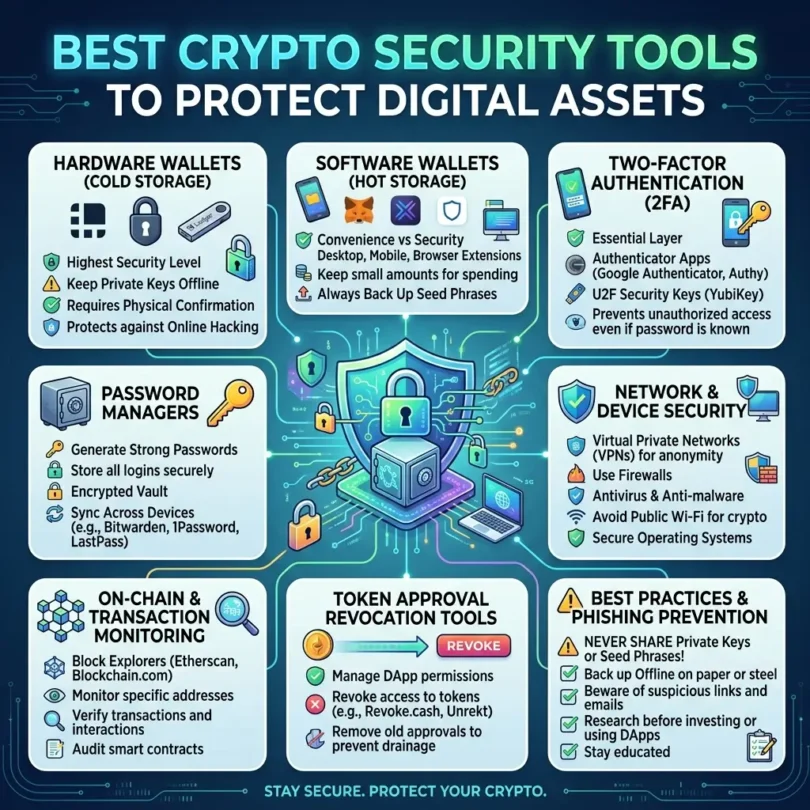
The best crypto security tools help protect exchange accounts, wallets, DeFi activity, NFTs, seed phrases, token approvals, browser sessions, smart contract interactions, and suspicious addresses. These tools do not remove all risk, but they can reduce common mistakes.
Security tools may include:
- Hardware security keys
- Password managers
- Hardware wallets
- Wallet scanners
- Token approval checkers
- Transaction simulators
- Browser phishing blockers
- Web3 anti-scam extensions
- Address reputation tools
- Blockchain explorers
- Wallet permission revokers
- Exchange account security settings
- Multi-signature wallets
- MPC custody systems
- Scam reporting platforms
- Malware protection tools
- Secure browsers and browser profiles
This guide compares the best crypto security tools to protect digital assets, explains what each tool does, and gives a practical safety setup for beginners, active traders, DeFi users, NFT collectors, and businesses.
Important Disclaimer
This article is for general informational purposes only. It is not legal, tax, investment, accounting, cybersecurity, custody, or professional advice.
Cryptocurrency involves risk. Security tools can reduce some risks, but they cannot guarantee protection. Blockchain transactions are usually irreversible. If you share your seed phrase, approve a malicious transaction, send assets to the wrong address, download fake software, or ignore warnings, you may lose assets permanently. Always research carefully and consult qualified professionals for serious security, tax, legal, or custody needs.
Why Crypto Security Tools Matter
Crypto is different from normal online accounts.
If someone hacks your email, you may recover it. If someone steals your exchange password, support might freeze your account if you act quickly. But if someone gets your seed phrase or tricks your wallet into signing a malicious transaction, funds can be moved on-chain and may be impossible to recover.
Common crypto attacks include:
- Seed phrase theft
- Fake wallet support scams
- Fake airdrops
- Fake mint websites
- Malicious token approvals
- Fake exchange login pages
- SIM-swap attacks
- Clipboard address malware
- Browser extension malware
- DeFi phishing
- NFT marketplace scams
- Wallet-drainer websites
- Fake hardware wallet devices
- Malicious smart contracts
- Discord and Telegram impersonation
- Social engineering
- Fake investment groups
- Fake recovery services
Modern scam pages can be extremely realistic. A 2026 report about a fake Pudgy Penguins phishing page described a scam site that copied wallet verification visuals and even displayed fake wallet-style overlays to trick users into giving information. The same report said the page could “play dead” when it detected research environments, making detection harder. (pcgamer.com)
That is why crypto users need multiple layers of protection.
Best Crypto Security Tools to Protect Digital Assets
Below are the best crypto security tools and categories to compare.
1. YubiKey
Best for: Strong exchange account protection and phishing-resistant login
Good for: Coinbase, Kraken, Gemini, email accounts, password managers, business accounts
Main strength: Hardware-based two-factor authentication
YubiKey is a physical security key made by Yubico. It helps secure online accounts using hardware-backed authentication.
Yubico describes YubiKey as a strong two-factor authentication security key used across many products and services. (yubico.com) Yubico also explains that FIDO2 supports built-in authenticators, synced passkeys, and external hardware security keys. (yubico.com)
Key Features
- Hardware security key
- FIDO2 support
- Passkey support
- Phishing-resistant login
- USB-A, USB-C, NFC options
- Works with many online services
- Stronger than SMS 2FA
- Useful for exchange accounts
- Useful for email accounts
- Useful for password managers
- Business-friendly authentication
Why YubiKey Is Good
A hardware security key is one of the strongest ways to protect exchange accounts and email accounts.
This matters because your email is often the recovery point for crypto exchanges, tax software, portfolio trackers, and cloud backups. If your email is compromised, attackers may reset passwords across other services.
YubiKey is especially useful for:
- Crypto exchange accounts
- Gmail or Google Workspace
- Password managers
- Cloud storage
- Business admin accounts
- Developer accounts
- Social accounts used for crypto communities
Best Fit
YubiKey may fit:
- Active traders
- Exchange users
- Business owners
- Crypto tax software users
- Portfolio tracker users
- Web3 founders
- NFT project owners
- Anyone with valuable accounts
Possible Downsides
If you lose your only security key and do not set backup recovery methods, you may get locked out. Use at least two keys: one daily key and one backup key stored safely.
2. Password Manager
Best for: Strong unique passwords across crypto accounts
Good for: Exchanges, emails, tax tools, custody tools, wallets, dashboards
Main strength: Prevents password reuse and weak passwords
A password manager is one of the most important crypto security tools.
Crypto users often have many accounts:
- Exchanges
- Email accounts
- Portfolio trackers
- Crypto tax software
- Wallet dashboards
- Payment gateways
- Custody tools
- DeFi dashboards
- NFT marketplaces
- Social accounts
- Cloud storage
- Hardware wallet apps
Using the same password across these accounts is dangerous.
Key Features
- Strong password generation
- Encrypted vault
- Autofill
- Password health reports
- Breach alerts
- Secure notes
- Passkey support in some tools
- Shared vaults for teams
- Emergency access options
- 2FA storage, where appropriate
Why Password Managers Are Good
A password manager lets you use a different strong password for every crypto-related account.
This reduces the risk that one leaked password compromises multiple accounts.
Best Fit
Password managers may fit:
- Everyone using crypto
- Exchange users
- Business teams
- DeFi users
- NFT collectors
- Tax software users
- Portfolio tracker users
Possible Downsides
The master password must be strong. The password manager itself should be protected with hardware-key 2FA or passkeys. Do not store seed phrases inside normal password manager notes unless you fully understand the risk and threat model. For seed phrases, offline storage is usually safer.
3. Hardware Wallets
Best for: Long-term private key protection
Good for: Bitcoin holders, Ethereum users, altcoin holders, NFT collectors
Main strength: Keeps private keys offline
Hardware wallets such as Ledger, Trezor, Coldcard, BitBox, Keystone, and SafePal help protect private keys from internet-connected devices.
Ledger explains that hardware wallets store private keys offline and users can restore assets using the Secret Recovery Phrase if the device is lost. (ledger.com)
Key Features
- Offline private key storage
- Device-based transaction signing
- Recovery phrase backup
- PIN protection
- Passphrase support on some devices
- Hardware confirmation screen
- Multi-asset support, depending on device
- Bitcoin-only options
- DeFi wallet connections
- NFT protection
Why Hardware Wallets Are Good
A hardware wallet reduces risk from malware, browser extension compromise, and private key theft because the private key stays inside the device.
It is one of the best tools for long-term storage.
Best Fit
Hardware wallets may fit:
- Long-term holders
- Anyone holding meaningful crypto value
- NFT collectors
- Businesses
- Bitcoin users
- DeFi users who connect hardware wallets to MetaMask or Rabby
Possible Downsides
Hardware wallets do not protect users from every mistake. If you sign a malicious transaction, share your seed phrase, use a fake hardware wallet, or send funds to the wrong address, losses can still happen.
4. Revoke.cash
Best for: Revoking risky token approvals
Good for: DeFi users, NFT traders, Ethereum and EVM wallet users
Main strength: Approval checking across 100+ networks
Revoke.cash is one of the most useful tools for DeFi and NFT users.
When users interact with dapps such as decentralized exchanges or NFT marketplaces, they often grant token approvals. These approvals allow a smart contract to spend certain tokens or NFTs from the wallet. If the contract is malicious or later compromised, approvals can create risk.
Revoke.cash says users can revoke token approvals and permissions granted on Ethereum and more than 100 other networks. (revoke.cash) Its Ethereum approval checker explains that users can see approval details such as date, amount, and spender, then revoke approvals with a wallet transaction that costs gas. (revoke.cash)
Key Features
- Token approval checker
- NFT approval checker
- Revoke permissions
- Ethereum support
- EVM network support
- 100+ network support
- Wallet permission review
- Approval details
- Spender contract visibility
- Gas-based revocation
Why Revoke.cash Is Good
Revoke.cash helps clean up old wallet permissions.
This matters because a user may have approved a dapp months ago and forgotten about it. If that approval remains unlimited, it can create risk.
Best Fit
Revoke.cash may fit:
- DeFi users
- NFT traders
- Airdrop hunters
- Wallet users
- Token swappers
- Anyone using dapps
- Users who signed many approvals
Possible Downsides
Revoking approvals costs gas. Also, revoking does not recover funds already stolen. It is a preventive hygiene tool, not a recovery service.
5. Etherscan Token Approval Checker
Best for: Ethereum approval review
Good for: Ethereum users, DeFi users, NFT users
Main strength: Approval visibility directly through Ethereum’s major block explorer
Etherscan’s Token Approval tool helps users review which contracts have permission to spend tokens from an address.
Etherscan explains that the Token Approvals page lists contracts approved to spend an address’s tokens and shows an “at risk” amount that may be vulnerable if those contracts are hacked. (etherscan.io)
Key Features
- Ethereum token approval checking
- Contract spender list
- At-risk amount visibility
- Approval review
- Connection with Etherscan explorer
- Useful for wallet hygiene
- Helps identify old approvals
Why Etherscan Approval Checker Is Good
Etherscan is widely used by Ethereum users. Its approval checker is helpful when you want to review wallet permissions without relying only on wallet interface warnings.
Best Fit
Etherscan Token Approval Checker may fit:
- Ethereum users
- DeFi users
- NFT users
- Wallet auditors
- Security-conscious investors
- People reviewing old wallets
Possible Downsides
Etherscan is mainly for Ethereum. For other EVM chains, use the relevant block explorer or tools like Revoke.cash and De.Fi Shield.
6. De.Fi Shield
Best for: Wallet risk scanning and DeFi permission review
Good for: DeFi users, multi-chain users, approval hygiene
Main strength: Wallet scanner and approval risk review
De.Fi Shield is part of the De.Fi Web3 security ecosystem. It helps users scan wallets, review approvals, and identify risky permissions.
De.Fi describes its Shield tool as a crypto wallet permissions revoking tool and part of its Web3 antivirus setup. (de.fi) De.Fi also says its platform lets users track assets across blockchains, audit token smart contracts, and access Web3 tools. (de.fi)
Key Features
- Wallet permission scanner
- Approval revoking
- Wallet health review
- DeFi risk alerts
- Smart contract scanner
- Token risk review
- Multi-chain support
- DeFi portfolio tracking
- Web3 antivirus branding
- Risk ratings
Why De.Fi Shield Is Good
De.Fi Shield is useful because it combines wallet tracking and security scanning. It is helpful for users who want to review risky approvals and understand wallet exposure.
Best Fit
De.Fi Shield may fit:
- DeFi users
- Multi-chain wallet users
- Token swappers
- Yield users
- NFT users
- People with many old approvals
- Wallet security reviewers
Possible Downsides
No scanner is perfect. Users should treat risk scores as guidance, not guaranteed protection. Always verify transactions manually.
7. MetaMask Security Alerts
Best for: Wallet-level scam and phishing warnings
Good for: MetaMask users, Ethereum users, DeFi users, NFT users
Main strength: Built-in wallet warnings before risky activity
MetaMask is one of the most widely used Web3 wallets. Its security alerts help warn users when suspicious activity is detected.
MetaMask says security alerts can warn users when it detects signals associated with scams, phishing attempts, impersonation, or harmful activity. (support.metamask.io) MetaMask’s main site also highlights security alerts, frontrun protection, Wallet Guard built in, and real-time threat monitoring. (metamask.io)
Key Features
- Wallet security alerts
- Scam warnings
- Phishing warnings
- Impersonation detection
- Harmful activity alerts
- Transaction protection features
- Built into MetaMask
- Web3 user education
- Broad dapp compatibility
Why MetaMask Security Alerts Are Good
Many users sign transactions too quickly. Security alerts can add a warning layer before users interact with risky sites or contracts.
This can help prevent common wallet-drainer attacks.
Best Fit
MetaMask security alerts may fit:
- MetaMask users
- DeFi users
- NFT collectors
- Ethereum users
- Layer-2 users
- Web3 beginners
- People who often connect to dapps
Possible Downsides
Warnings are not perfect. Users should still verify websites, transaction details, token approvals, and contract addresses.
8. Scam Sniffer
Best for: Web3 phishing protection and malicious site alerts
Good for: DeFi users, NFT users, Discord communities, Web3 teams
Main strength: Real-time scam and phishing detection
Scam Sniffer is an all-in-one Web3 anti-scam solution. It provides tools for identifying scam websites, malicious URLs, and risky Web3 activity.
Scam Sniffer describes itself as an all-in-one Web3 anti-scam solution. (scamsniffer.io) Its browser extension page says it combines a malicious website detection engine and multiple blacklist data sources to provide real-time protection before users open malicious links. (scamsniffer.io)
Key Features
- Web3 phishing detection
- Malicious website warnings
- Browser extension
- Blacklist data sources
- Discord/community protection tools
- API for platforms
- Scam link detection
- Real-time alerts
- Wallet-drainer protection support
Why Scam Sniffer Is Good
Scam Sniffer is useful because many crypto thefts begin with a link. If a tool can warn users before they open a malicious site, it may prevent the dangerous wallet connection from happening.
Best Fit
Scam Sniffer may fit:
- NFT users
- DeFi users
- Discord moderators
- Web3 communities
- Crypto project teams
- Airdrop hunters
- Users clicking many Web3 links
Possible Downsides
A browser extension is another piece of software to trust. Install only from official links, review permissions, and keep it updated.
9. Rabby Wallet
Best for: DeFi transaction previews and EVM wallet safety
Good for: Ethereum users, Layer-2 users, DeFi users, advanced wallet users
Main strength: Transaction preview and risk-focused wallet experience
Rabby Wallet is a Web3 wallet for Ethereum and EVM networks. It is popular among DeFi users because it shows transaction previews and risk warnings before signing.
Rabby’s website says it is open source on GitHub and has been audited by SlowMist and Least Authority. (rabby.io) Tenderly’s documentation explains that transaction preview can simulate transaction execution and show expected outcomes without sending transactions on-chain, helping users better understand transaction effects before sending. (tenderly.co)
Key Features
- EVM wallet
- Transaction preview
- Risk warnings
- DeFi-focused interface
- Multi-chain support
- Hardware wallet support
- Open-source code
- Security audits listed
- Token approval awareness
- Better transaction readability
Why Rabby Wallet Is Good
Rabby is useful because many wallet attacks rely on users not understanding what they are signing.
Transaction simulation and preview can help users see whether a transaction is expected to move assets, approve permissions, or interact with risky contracts.
Best Fit
Rabby may fit:
- DeFi users
- Ethereum users
- Arbitrum users
- Optimism users
- Base users
- Polygon users
- Advanced EVM users
- Hardware wallet users needing a safer front-end
Possible Downsides
Rabby is more advanced than beginner wallets. Users must still verify websites and transaction details. Simulation is helpful, but not a guarantee.
10. Chainabuse
Best for: Reporting and checking crypto scams
Good for: Scam victims, investigators, communities, wallet reviewers
Main strength: Public scam reporting and threat tracking
Chainabuse is a public crypto scam reporting platform.
Chainabuse says users can report, track, and prevent cryptocurrency scams, and stay informed about blockchain threats. (chainabuse.com)
Key Features
- Crypto scam reporting
- Address reporting
- Scam tracking
- Community reports
- Blockchain threat awareness
- Investigation support
- Public scam database
- Useful for checking suspicious addresses
- Helps communities share threat information
Why Chainabuse Is Good
If you encounter a suspicious address, scam website, fake support account, or wallet-drainer link, reporting it can help others. Chainabuse can also help users check whether an address has already been reported.
Best Fit
Chainabuse may fit:
- Scam victims
- Crypto communities
- Investigators
- Web3 moderators
- Wallet reviewers
- Users checking suspicious addresses
Possible Downsides
A reported address is not automatically proof in every case, and unreported addresses can still be dangerous. Use Chainabuse as one signal, not the only decision point.
Quick Comparison Table
| Tool | Best For | Main Strength | Good Fit |
|---|---|---|---|
| YubiKey | Account login security | Hardware 2FA/passkeys | Exchange and email users |
| Password manager | Strong unique passwords | Password hygiene | Everyone |
| Hardware wallets | Long-term key protection | Offline private keys | Long-term holders |
| Revoke.cash | Token approval cleanup | 100+ network approval revoking | DeFi and NFT users |
| Etherscan Approval Checker | Ethereum permissions | Approval visibility | Ethereum users |
| De.Fi Shield | Wallet risk scanning | Wallet health and revokes | DeFi users |
| MetaMask Security Alerts | Wallet warnings | Scam and phishing alerts | MetaMask users |
| Scam Sniffer | Anti-phishing | Malicious URL detection | Web3 users |
| Rabby Wallet | Transaction preview | DeFi transaction simulation | EVM users |
| Chainabuse | Scam reporting | Public scam reports | Communities and victims |
Best Crypto Security Tools by User Type
Best for Beginners
Best tools:
- Password manager
- YubiKey
- Hardware wallet
- MetaMask security alerts
- Revoke.cash
- Scam Sniffer
Beginners should focus on account protection, seed phrase safety, and avoiding malicious links.
Best for Exchange Users
Best tools:
- YubiKey
- Password manager
- Authenticator app
- Exchange withdrawal allowlist
- Email security
- Anti-phishing code, where available
Exchange users should protect the account and the email used for recovery.
Best for DeFi Users
Best tools:
- Rabby Wallet
- Revoke.cash
- De.Fi Shield
- MetaMask security alerts
- Hardware wallet connected to wallet front-end
- Scam Sniffer
- Etherscan approval checker
DeFi users sign many transactions, so transaction preview and approval review matter.
Best for NFT Collectors
Best tools:
- Hardware wallet
- Scam Sniffer
- MetaMask alerts
- Revoke.cash
- Etherscan approval checker
- Separate mint wallet
- Separate vault wallet
NFT users should never mint from their main vault wallet.
Best for Businesses
Best tools:
- YubiKey
- Password manager with team controls
- Multi-signature wallet
- MPC custody platform
- Hardware wallets
- Role-based permissions
- Chainabuse
- Crypto accounting software
- Secure email
- Internal approval policy
Businesses need processes, not just tools.
Crypto Security Setup for Most Users
A practical setup may look like this:
Basic Setup
- Use a password manager.
- Use unique passwords for every crypto account.
- Enable app-based 2FA.
- Add YubiKey for exchange and email.
- Use a hardware wallet for long-term holdings.
- Keep seed phrase offline.
- Use Revoke.cash monthly.
- Bookmark official websites.
DeFi Setup
- Use hardware wallet for important assets.
- Use Rabby or MetaMask with security alerts.
- Use a separate wallet for testing dapps.
- Use Revoke.cash after risky activity.
- Use De.Fi Shield for wallet scans.
- Use Scam Sniffer for phishing protection.
- Never sign blind messages.
NFT Setup
- Use a vault wallet for valuable NFTs.
- Use a separate mint wallet.
- Revoke marketplace approvals regularly.
- Avoid Discord mint links unless verified.
- Use hardware wallet for high-value NFTs.
- Use Scam Sniffer and MetaMask alerts.
- Confirm collection URLs manually.
Business Setup
- Use hardware security keys for all admins.
- Use a team password manager.
- Use role-based access.
- Require multiple approvals for transfers.
- Use multi-sig or MPC custody.
- Keep accounting and custody records.
- Review access monthly.
- Document incident response.
Wallet Approval Hygiene
Token approvals are one of the most important DeFi security topics.
When you approve a smart contract, you may give it permission to spend your tokens.
Some approvals are limited. Others are unlimited. Unlimited approvals can create risk if the contract is malicious, compromised, or copied by a phishing site.
Use:
- Revoke.cash
- Etherscan Token Approval Checker
- De.Fi Shield
- MetaMask Portfolio approval tools
MetaMask also explains that its Portfolio dapp includes a feature to view allowances and submit revocation transactions directly. (support.metamask.io)
Good approval habits:
- Revoke old approvals.
- Avoid unlimited approvals when possible.
- Use separate wallets.
- Do not approve unknown contracts.
- Review spender addresses.
- Revoke after using high-risk dapps.
- Use hardware wallet confirmation.
- Avoid connecting vault wallets to random websites.
Seed Phrase Protection Tools and Habits
A seed phrase should be protected offline.
Good options include:
- Paper backup in safe place
- Metal seed backup
- Fire-resistant storage
- Safe deposit box, depending on plan
- Split backup strategy, if properly understood
- Inheritance instructions with legal guidance
Avoid:
- Screenshots
- Google Drive
- iCloud
- Telegram
- Password manager notes, unless you fully understand risk
- Printing on shared printers
- Giving phrase to support
- Typing phrase into websites
- Taking photos during setup
A security tool cannot protect a seed phrase once you reveal it.
Browser Security for Crypto Users
Many Web3 attacks happen through browsers.
Use these habits:
- Create a separate browser profile for crypto.
- Install only necessary extensions.
- Remove unused extensions.
- Bookmark official dapp URLs.
- Avoid clicking ads for wallet downloads.
- Avoid unknown “support” links.
- Turn off auto-downloads.
- Keep browser updated.
- Use security extensions from official sources only.
- Do not mix risky browsing with wallet activity.
A dedicated crypto browser profile can reduce exposure.
Exchange Account Security Checklist
For every exchange account:
- Use a unique password.
- Enable YubiKey or passkey if supported.
- Use authenticator app instead of SMS when possible.
- Enable withdrawal allowlist.
- Set anti-phishing code, if available.
- Protect email with YubiKey.
- Disable unused API keys.
- Use read-only API keys for trackers.
- Never give API withdrawal permission to portfolio tools.
- Review login sessions.
- Review devices.
- Add account recovery backups carefully.
- Keep tax records downloaded.
- Test small withdrawals before large transfers.
Exchange security starts with email security.
Crypto Security Red Flags
Avoid any website, person, or tool that:
- Asks for your seed phrase
- Asks for your private key
- Claims to be wallet support in DMs
- Promises guaranteed recovery
- Asks you to “validate” your wallet
- Sends urgent mint links
- Uses fake countdown pressure
- Offers free NFTs from unknown sources
- Asks you to install remote-access software
- Offers to double your crypto
- Sends fake exchange login pages
- Uses misspelled domain names
- Requires unlimited token approval
- Hides transaction details
- Claims “no risk” or “guaranteed return”
- Asks for withdrawal API permission
No legitimate support agent needs your seed phrase.
Common Crypto Security Mistakes
Mistake 1: Using SMS 2FA Only
SMS can be vulnerable to SIM-swap attacks. Use hardware keys or authenticator apps where possible.
Mistake 2: Reusing Passwords
One leaked password can expose multiple accounts.
Mistake 3: Keeping Everything in One Wallet
Separate vault, DeFi, NFT, and testing wallets.
Mistake 4: Not Revoking Approvals
Old approvals can become dangerous.
Mistake 5: Signing Too Quickly
Read transaction details before signing.
Mistake 6: Using a Hot Wallet for Large Holdings
Large holdings should usually be in cold storage or institutional custody.
Mistake 7: Downloading Wallets From Search Ads
Use official websites only.
Mistake 8: Ignoring Scam Reports
Check suspicious addresses and URLs.
Mistake 9: Sharing Screens During Wallet Setup
Never show seed phrases or private keys on camera.
Mistake 10: No Recovery Plan
If you lose access, your family or team may be unable to recover assets. Plan carefully with professional help.
Best Crypto Security Stack by Budget
Free or Low-Cost Stack
- Password manager free plan
- Authenticator app
- Revoke.cash
- Etherscan approval checker
- Chainabuse
- MetaMask security alerts
- Scam Sniffer extension
- Dedicated browser profile
- Offline seed phrase backup
Mid-Level Stack
- Paid password manager
- Two YubiKeys
- Hardware wallet
- Metal seed backup
- Revoke.cash
- De.Fi Shield
- Rabby Wallet
- Separate DeFi wallet
- Separate vault wallet
Business Stack
- Team password manager
- Hardware security keys for every admin
- Multi-signature wallet
- MPC custody platform
- Hardware wallet backups
- Crypto accounting software
- Internal approval policy
- Monthly access review
- Incident response plan
- Legal and tax review
Final Verdict: What Are the Best Crypto Security Tools?
The best crypto security tools depend on your activity.
For most users:
- Best account protection: YubiKey
- Best password hygiene: Password manager
- Best long-term storage: Hardware wallet
- Best approval cleanup: Revoke.cash
- Best Ethereum approval review: Etherscan Token Approval Checker
- Best DeFi wallet scanner: De.Fi Shield
- Best MetaMask user protection: MetaMask security alerts
- Best phishing link protection: Scam Sniffer
- Best DeFi transaction preview: Rabby Wallet
- Best scam reporting platform: Chainabuse
A beginner should start with password manager, 2FA, YubiKey, hardware wallet, and basic approval cleanup. A DeFi user should add Revoke.cash, Rabby, De.Fi Shield, Scam Sniffer, and a separate wallet structure. An NFT collector should use vault wallets, mint wallets, phishing tools, and regular approval revokes. A business should use hardware keys, team password controls, multi-sig or MPC custody, internal policies, and monthly access reviews.
Crypto security is not one tool. It is a layered system.
The safest users do not depend on luck. They reduce risk before something goes wrong.
FAQs About Crypto Security Tools
What are crypto security tools?
Crypto security tools help protect wallets, exchange accounts, private keys, token approvals, DeFi transactions, NFTs, and suspicious addresses. Examples include hardware wallets, YubiKeys, password managers, Revoke.cash, De.Fi Shield, MetaMask alerts, Scam Sniffer, Rabby Wallet, and Chainabuse.
What is the best crypto security tool?
There is no single best tool for every user. YubiKey is excellent for account security, hardware wallets are strong for long-term storage, Revoke.cash is useful for approval cleanup, and Rabby is helpful for DeFi transaction preview.
Is YubiKey good for crypto?
Yes. YubiKey is very useful for protecting exchange accounts, email accounts, password managers, and admin accounts. Yubico describes YubiKey as a strong two-factor authentication security key. (yubico.com)
What is Revoke.cash used for?
Revoke.cash is used to check and revoke token approvals and wallet permissions. It supports Ethereum and more than 100 other networks. (revoke.cash)
What is Etherscan Token Approval Checker?
Etherscan’s Token Approval Checker shows contracts approved to spend tokens from an Ethereum address and displays an at-risk amount if those contracts were hacked. (etherscan.io)
Is De.Fi Shield useful?
Yes. De.Fi Shield helps users review wallet permissions and revoke risky approvals. De.Fi describes it as part of its Web3 antivirus tools. (de.fi)
Do MetaMask security alerts protect against scams?
MetaMask security alerts can warn users when signals linked to scams, phishing, impersonation, or harmful activity are detected. (support.metamask.io) They help, but users still need to verify transactions manually.
What is Scam Sniffer?
Scam Sniffer is a Web3 anti-scam tool that helps detect malicious websites and phishing links. Its extension page says it uses a malicious website detection engine and blacklist sources for real-time protection. (scamsniffer.io)
Is Rabby safer than normal wallets?
Rabby is useful for DeFi users because it focuses on transaction preview and risk warnings. Its website says it is open source and has been audited by SlowMist and Least Authority. (rabby.io)
What is Chainabuse used for?
Chainabuse is used to report, track, and prevent crypto scams. It can help users and communities share scam information. (chainabuse.com)
Can security tools recover stolen crypto?
Usually no. Security tools are mainly preventive. Once crypto is stolen and moved on-chain, recovery can be difficult or impossible.
What is the safest setup for crypto?
A safer setup includes a hardware wallet, offline seed phrase backup, YubiKey for exchange and email accounts, password manager, separate wallets for DeFi and storage, Revoke.cash approval cleanup, phishing protection, and careful transaction review.
Suggested Internal Links
Add these internal links when related articles are published:
- Best Crypto Tax Software for Investors and Traders
- Best Crypto Exchanges for Beginners and Active Traders
- Best Crypto Wallets for Safe Bitcoin and Altcoin Storage
- Best Hardware Wallets for Long-Term Crypto Security
- Best Crypto Portfolio Trackers for Serious Investors
- Best Crypto Accounting Software for Businesses
- Best Crypto Payment Gateways for Online Businesses
- Best Crypto Custody Solutions for Institutions and Businesses
- Best Crypto Tax Accountants and Reporting Services
SEO Keywords to Use Naturally
Primary Keyword: crypto security tools
Secondary Keywords: best crypto security tools, crypto wallet security tools, Web3 security tools, DeFi security tools, crypto phishing protection, crypto scam checker, wallet approval checker, token approval checker, Revoke.cash, Etherscan token approval checker, De.Fi Shield, MetaMask security alerts, Scam Sniffer, Rabby Wallet, Chainabuse, YubiKey crypto security, hardware wallet security, crypto password manager, crypto 2FA, crypto seed phrase security, crypto wallet scanner, crypto transaction simulator, NFT security tools, DeFi wallet safety, crypto exchange security, digital asset protection.