
A hardware wallet is one of the strongest tools for long-term crypto security.
Crypto exchanges are useful for buying, selling, and trading. Hot wallets are useful for DeFi, NFTs, and daily Web3 activity. But when someone wants to store Bitcoin, Ethereum, stablecoins, NFTs, and altcoins for the long term, a hardware wallet is usually safer than leaving everything on an exchange or browser wallet.
The reason is simple: hardware wallets are designed to keep private keys offline.
Ledger explains that hardware wallets store private keys offline, giving users full control and enhanced security. Ledger also says that if a hardware wallet is lost, users can restore access using the Secret Recovery Phrase.
Trezor also explains that hardware wallets protect private keys and use wallet backups, also known as recovery phrases, to restore access when needed.
But hardware wallets are not magic.
They protect against many online attacks, but users can still lose crypto by entering a recovery phrase into a fake website, buying a fake device, signing a malicious transaction, sending crypto to the wrong address, losing the seed phrase, or failing to verify the receiving address on the device screen.
This guide compares the best hardware wallets for long-term crypto security, explains how cold storage works, shows which wallet is best for different users, and gives a practical safety checklist before buying or using any device.
Important Disclaimer
This article is for general informational purposes only. It is not legal, tax, investment, cybersecurity, accounting, or professional advice.
Cryptocurrency involves risk. Hardware wallets reduce some security risks, but they do not remove all risks. Blockchain transactions are usually irreversible. If you lose your recovery phrase, share it with a scammer, approve a malicious transaction, or send funds to the wrong address, recovery may be impossible. Always research carefully and consult qualified professionals before making decisions about crypto storage, taxes, custody, or security.
What Is a Hardware Wallet?
A hardware wallet is a physical device designed to protect crypto private keys.
Instead of storing private keys directly on an internet-connected computer or mobile phone, a hardware wallet keeps the keys inside the device. When you want to send crypto, the transaction is prepared on a computer or phone, but the signing happens on the hardware wallet.
This means the private key does not need to leave the device.
A hardware wallet can help users:
- Store Bitcoin for the long term
- Store Ethereum and altcoins
- Protect NFTs
- Use cold storage
- Sign transactions offline or semi-offline
- Connect with wallet apps
- Use DeFi with better key protection
- Reduce malware exposure
- Confirm receiving and sending addresses
- Recover assets using a seed phrase
- Create a stronger self-custody setup
A hardware wallet is especially useful for people who hold crypto for months or years and do not need to trade every day.
Hardware Wallet vs Hot Wallet
Before choosing a device, understand the difference.
Hot Wallet
A hot wallet is connected to the internet.
Examples include:
- MetaMask
- Trust Wallet
- Coinbase Wallet
- Phantom
- Exodus
- Rabby
- Mobile wallets
- Browser extension wallets
Hot wallets are convenient, but they are more exposed to phishing, malware, fake websites, browser extension risk, and malicious approvals.
Hardware Wallet
A hardware wallet stores private keys on a physical device.
Examples include:
- Ledger
- Trezor
- Coldcard
- BitBox
- Keystone
- SafePal hardware wallet
- Tangem
- OneKey
Hardware wallets are better for long-term storage because private keys are not stored directly on your daily computer or phone.
Hardware Wallet vs Exchange Storage
Many beginners keep crypto on an exchange because it is easy.
That can be convenient, but it means the exchange controls the custody setup. If the exchange freezes withdrawals, faces legal trouble, gets hacked, or becomes insolvent, users may face serious risk.
A hardware wallet gives users direct self-custody. But self-custody also means the user becomes responsible for backup and security.
Exchange Storage Pros
- Easy to buy and sell
- Password reset may be possible
- Customer support may help
- No seed phrase management
- Good for active trading
Exchange Storage Cons
- Platform risk
- Withdrawal freezes possible
- Account lock risk
- Exchange hack risk
- Legal or regional restrictions
- Not ideal for large long-term balances
Hardware Wallet Pros
- Private keys stored offline
- Better long-term storage
- User controls assets
- Lower exposure to exchange failure
- Can work with wallet apps
- Better for serious self-custody
Hardware Wallet Cons
- User must protect recovery phrase
- Device costs money
- Setup requires care
- No central password reset
- Fake-device scams exist
- Mistakes can be permanent
A common setup is to use an exchange for buying and selling, then move long-term holdings to a hardware wallet.
Best Hardware Wallets for Long-Term Crypto Security
Below are the best hardware wallets to compare. The right choice depends on whether you want Bitcoin-only storage, multi-asset support, touchscreen design, mobile use, air-gapped signing, DeFi support, or team-level security.
1. Ledger Nano X
Best for: Multi-asset users who want mobile-friendly cold storage
Good for: Bitcoin, Ethereum, altcoins, NFTs, mobile users
Main strength: Broad asset support and Bluetooth convenience
Ledger Nano X is one of the most popular hardware wallets for people who want to store many crypto assets. It supports Ledger Live and can be used with third-party wallets for several chains.
Ledger says hardware wallets store private keys offline and that users can restore assets using the Secret Recovery Phrase if the device is lost.
Key Features
- Offline private key storage
- Bluetooth support
- USB connection
- Ledger Live app
- Multi-asset support
- Bitcoin support
- Ethereum support
- NFT support
- Staking support for selected assets
- PIN protection
- Secret Recovery Phrase backup
- Mobile-friendly design
- Transaction confirmation on device
Why Ledger Nano X Is Good
Ledger Nano X is useful for people who want a hardware wallet that works with both desktop and mobile devices. Bluetooth makes it more convenient for mobile users, especially compared with USB-only devices.
It is also strong for multi-asset users because Ledger supports many coins and tokens through Ledger Live and third-party wallet integrations.
Best Fit
Ledger Nano X may fit:
- Mobile users
- Multi-asset holders
- Ethereum users
- NFT holders
- Long-term altcoin investors
- People who want Ledger Live
- Users who want Bluetooth convenience
Possible Downsides
Bluetooth convenience may not appeal to users who want the most minimal attack surface. Some security-focused users prefer USB-only or fully air-gapped wallets. Ledger has also faced community debate in the past around recovery-related features, so users should understand Ledger’s ecosystem and settings before choosing.
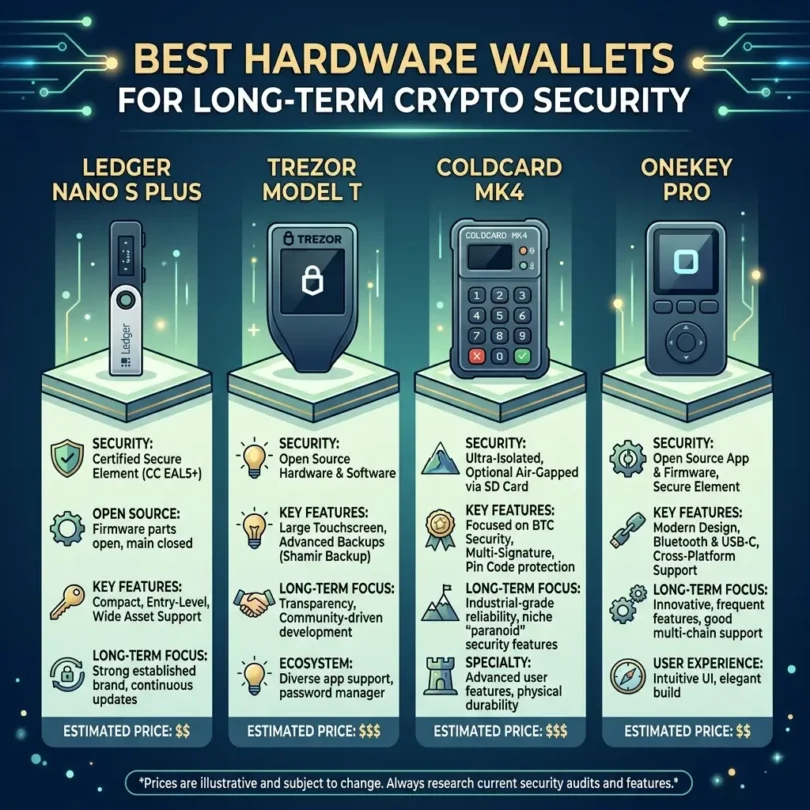
2. Ledger Nano S Plus
Best for: Affordable Ledger cold storage
Good for: Beginners, multi-asset holders, desktop users
Main strength: Ledger security at a lower device cost
Ledger Nano S Plus is a popular entry-level Ledger hardware wallet. It has no Bluetooth, which some users prefer because it keeps the device simpler.
Key Features
- Offline private key storage
- USB-C connection
- Ledger Live support
- Multi-asset support
- NFT support
- PIN protection
- Secret Recovery Phrase backup
- Smaller design
- Good for desktop users
- Lower cost than higher-end Ledger devices
Why Ledger Nano S Plus Is Good
Ledger Nano S Plus may be a strong choice for beginners who want a known hardware wallet brand without paying for premium features like Bluetooth or a touchscreen.
It is also good for people who mainly use desktop and do not need mobile Bluetooth access.
Best Fit
Ledger Nano S Plus may fit:
- Beginners
- Desktop users
- Multi-asset holders
- Cost-conscious users
- People who do not need Bluetooth
- Long-term holders
Possible Downsides
It is not as mobile-friendly as Nano X. Users who want a larger screen or touchscreen may prefer Ledger Stax, Ledger Flex, Keystone, or Trezor Safe 5.
3. Ledger Stax
Best for: Premium touchscreen Ledger users
Good for: NFT holders, multi-asset users, premium hardware buyers
Main strength: Large E Ink touchscreen and premium user experience
Ledger Stax is a premium Ledger hardware wallet designed with a larger E Ink touchscreen. It is aimed at users who want a more modern device experience compared with the Nano series.
Key Features
- E Ink touchscreen
- Offline private key storage
- Ledger Live support
- Multi-asset support
- NFT display features
- Bluetooth support
- USB-C support
- Wireless charging support, depending on model details
- PIN protection
- Recovery phrase backup
Why Ledger Stax Is Good
Ledger Stax may fit users who want stronger transaction readability and a premium design. A larger screen can help users review transaction details more comfortably than tiny-screen devices.
Best Fit
Ledger Stax may fit:
- Premium buyers
- NFT users
- Multi-asset holders
- Users who want touchscreen controls
- People who prefer a larger display
- Ledger ecosystem users
Possible Downsides
It costs more than basic hardware wallets. Users who only need simple Bitcoin storage may not need this level of device.
4. Trezor Safe 5
Best for: Touchscreen Trezor experience and open-source-focused users
Good for: Bitcoin, Ethereum, altcoins, security-focused users
Main strength: Trezor ecosystem with modern hardware
Trezor Safe 5 is a newer Trezor model designed for users who want a more modern touchscreen hardware wallet experience.
Trezor explains that hardware wallets protect private keys and use wallet backups or recovery phrases for recovery.
Key Features
- Touchscreen interface
- Trezor Suite support
- Bitcoin support
- Ethereum support
- Altcoin support
- Recovery phrase backup
- PIN protection
- Passphrase support
- Open-source ecosystem focus
- Device-based transaction confirmation
- Secure hardware design
Why Trezor Safe 5 Is Good
Trezor Safe 5 is a strong option for people who like Trezor’s open-source approach but want a modern touchscreen device. It is easier to use than older button-based hardware wallets.
Best Fit
Trezor Safe 5 may fit:
- Trezor fans
- Security-focused users
- Multi-asset holders
- Users who want touchscreen control
- People who value open-source tools
- Long-term holders
Possible Downsides
Users should check asset support before buying. Some assets may have better support on Ledger or other wallets.
5. Trezor Safe 3
Best for: Affordable Trezor cold storage
Good for: Beginners, Bitcoin users, multi-asset holders
Main strength: Lower-cost Trezor hardware wallet
Trezor Safe 3 is a more affordable Trezor option. It gives users access to Trezor’s self-custody setup without paying for the higher-end touchscreen device.
Key Features
- Hardware wallet protection
- Trezor Suite support
- Bitcoin support
- Ethereum and selected altcoins
- PIN protection
- Recovery phrase backup
- Passphrase support
- Open-source ecosystem focus
- Device confirmation
Why Trezor Safe 3 Is Good
Trezor Safe 3 is a good entry point for users who want a trusted hardware wallet with a simpler design and lower price.
Best Fit
Trezor Safe 3 may fit:
- Beginners
- Cost-conscious users
- Bitcoin holders
- Users who want Trezor Suite
- People who value open-source tools
- Long-term holders
Possible Downsides
It lacks the larger touchscreen experience of Trezor Safe 5. Users who frequently confirm complex transactions may prefer a larger display.
6. Coldcard Q
Best for: Advanced Bitcoin-only cold storage
Good for: Bitcoin maximalists, long-term BTC holders, air-gapped users
Main strength: Bitcoin-only design and air-gapped signing
Coldcard Q is a premium Bitcoin-only signing device from Coinkite.
Coldcard describes itself as a Bitcoin-only hardware wallet that is open source, air-gapped, and designed for sovereign Bitcoin storage. It stores private keys in dual secure elements and signs transactions fully air-gapped.
Coldcard Q adds a full QWERTY keyboard, 3.2-inch LCD screen, built-in QR scanner, dual MicroSD slots, and battery-powered operation for fully air-gapped use.
Key Features
- Bitcoin-only design
- Air-gapped signing
- Full QWERTY keyboard
- QR code scanner
- Dual MicroSD slots
- Battery operation
- Dual secure elements
- Open-source firmware
- Passphrase support
- Advanced Bitcoin controls
- No companion cloud account
- Strong sovereign custody design
Why Coldcard Q Is Good
Coldcard Q is one of the strongest choices for advanced Bitcoin users who want a serious cold storage setup. Its Bitcoin-only design reduces complexity by avoiding thousands of altcoin integrations.
Air-gapped signing also appeals to users who want to avoid directly connecting the device to a computer for transaction signing.
Best Fit
Coldcard Q may fit:
- Bitcoin-only holders
- Advanced users
- Long-term BTC storage
- Users who want air-gapped signing
- People who use PSBT workflows
- Security-focused Bitcoin users
Possible Downsides
Coldcard is not beginner-friendly compared with Ledger, Trezor, or SafePal. It is Bitcoin-only, so it is not suitable for altcoin storage. Users must be comfortable with Bitcoin transaction workflows.
7. Coldcard Mk4
Best for: Advanced Bitcoin cold storage at lower cost than Coldcard Q
Good for: Bitcoin users, air-gapped users, security-focused holders
Main strength: Bitcoin-only security design
Coldcard Mk4 is another Bitcoin-only hardware wallet from Coinkite. It is smaller than Coldcard Q and is popular among advanced Bitcoin users.
Bitcoin.org describes Coldcard as an ultra-secure hardware wallet with verifiable source code, encrypted microSD backup, and private key storage in a dedicated security chip.
Key Features
- Bitcoin-only
- Air-gapped workflows
- MicroSD support
- Secure element
- Open-source firmware
- PIN protection
- Passphrase support
- Advanced Bitcoin functions
- PSBT support
- No altcoin support
Why Coldcard Mk4 Is Good
Coldcard Mk4 is a strong choice for Bitcoin users who want advanced security but do not need the larger screen and keyboard of Coldcard Q.
Best Fit
Coldcard Mk4 may fit:
- Bitcoin-only users
- Advanced cold storage users
- People who understand PSBTs
- Long-term BTC holders
- Users wanting air-gapped workflows
Possible Downsides
It is not designed for casual beginners. It does not support altcoins.
8. BitBox02
Best for: Simple and clean hardware wallet experience
Good for: Bitcoin users, Ethereum users, security-focused beginners
Main strength: Simple design and strong backup workflow
BitBox02 by Shift Crypto is a compact hardware wallet known for its clean interface and microSD backup system. It comes in multi-asset and Bitcoin-only editions.
Key Features
- Compact hardware design
- Bitcoin-only edition available
- Multi-asset edition available
- MicroSD backup
- BitBoxApp support
- Touch sensors
- USB-C connection
- Secure chip
- Open-source app and firmware focus
- Simple setup
- Passphrase support
Why BitBox02 Is Good
BitBox02 is a good middle-ground wallet. It is simpler than Coldcard but more security-focused than many beginner devices.
The Bitcoin-only version is attractive for BTC holders who want fewer features and a reduced attack surface. The multi-asset version is better for users who hold Ethereum and selected altcoins.
Best Fit
BitBox02 may fit:
- Bitcoin holders
- Security-focused beginners
- Users wanting simple setup
- People who like microSD backup
- Users who want Bitcoin-only option
- Multi-asset holders, if using the multi-edition
Possible Downsides
Asset support is not as broad as Ledger. Users with many altcoins should check compatibility first.
9. Keystone
Best for: Air-gapped touchscreen wallet users
Good for: QR-based signing, DeFi users, multi-chain users
Main strength: Air-gapped QR transaction workflow
Keystone is a hardware wallet known for QR-code-based signing and air-gapped design. It is often used with wallet apps for Ethereum and other ecosystems.
Key Features
- Air-gapped signing
- QR code transaction flow
- Touchscreen
- Multi-chain support
- Open-source focus for some components
- Fingerprint support on selected models
- MicroSD updates
- Compatible with selected Web3 wallets
- Hardware confirmation
- Seed phrase backup
Why Keystone Is Good
Keystone is attractive to users who want a touchscreen hardware wallet and prefer QR-based air-gapped signing rather than USB or Bluetooth.
It may be especially useful for DeFi users who want a more visual transaction confirmation experience.
Best Fit
Keystone may fit:
- Air-gapped wallet users
- DeFi users
- Touchscreen fans
- Multi-chain users
- People who prefer QR signing
- Users avoiding USB/Bluetooth signing
Possible Downsides
Users must check app compatibility before buying. Some chains and apps may not work as smoothly as Ledger or Trezor integrations.
10. SafePal S1
Best for: Budget air-gapped hardware wallet
Good for: Mobile users, multi-chain holders, beginners wanting cold storage
Main strength: Affordable offline signing device
SafePal S1 is a popular budget hardware wallet. SafePal says the S1 uses an EAL 6+ independent secure element, true random number generator, multiple layers of security sensors, anti-tampering self-destruct mechanism, and a 100% air-gapped signing mechanism with no Bluetooth, Wi-Fi, NFC, or USB connection.
Key Features
- Air-gapped signing
- QR code transaction flow
- Mobile app integration
- Secure element
- Anti-tampering mechanism
- Multi-chain support
- NFT support
- No Bluetooth
- No Wi-Fi
- No NFC
- No USB signing connection
- Budget-friendly price point
Why SafePal S1 Is Good
SafePal S1 is attractive because it offers air-gapped signing at a lower price than many premium hardware wallets.
It is a strong option for mobile users who want better security than a hot wallet but do not want to spend as much on premium cold storage devices.
Best Fit
SafePal S1 may fit:
- Budget users
- Mobile users
- Multi-chain holders
- Beginners wanting cold storage
- Users who like QR signing
- People who want an offline device
Possible Downsides
SafePal’s mobile-app-based workflow may not appeal to everyone. Users should check supported assets and make sure they understand the QR signing process before storing large amounts.
Quick Comparison Table
| Hardware Wallet | Best For | Main Strength | Best User Type |
|---|---|---|---|
| Ledger Nano X | Mobile multi-asset storage | Bluetooth + broad support | Mobile users |
| Ledger Nano S Plus | Affordable Ledger storage | Lower-cost cold wallet | Beginners |
| Ledger Stax | Premium touchscreen storage | Large E Ink display | Premium users |
| Trezor Safe 5 | Modern Trezor experience | Touchscreen + open-source focus | Security-focused users |
| Trezor Safe 3 | Affordable Trezor storage | Lower-cost Trezor option | Beginners |
| Coldcard Q | Bitcoin-only advanced security | Air-gapped + QWERTY | Bitcoin experts |
| Coldcard Mk4 | Bitcoin cold storage | Air-gapped Bitcoin signing | Advanced BTC holders |
| BitBox02 | Simple secure storage | Clean setup + microSD backup | Security-focused beginners |
| Keystone | QR-based air-gapped signing | Touchscreen + QR workflow | DeFi users |
| SafePal S1 | Budget air-gapped wallet | Offline QR signing | Budget users |
Best Hardware Wallet by Use Case
Best Hardware Wallet for Beginners
Best options:
- Ledger Nano S Plus
- Trezor Safe 3
- SafePal S1
- BitBox02
Beginners should choose a wallet with simple setup, clear recovery instructions, strong documentation, and broad support.
Best Hardware Wallet for Bitcoin Only
Best options:
- Coldcard Q
- Coldcard Mk4
- Trezor Safe 3 Bitcoin-only setup
- BitBox02 Bitcoin-only edition
Bitcoin-only users may prefer wallets with fewer altcoin features because fewer features can reduce complexity.
Best Hardware Wallet for Altcoins
Best options:
- Ledger Nano X
- Ledger Nano S Plus
- Ledger Stax
- Trezor Safe 5
- SafePal S1
- Keystone
Altcoin users should check chain support before buying.
Best Hardware Wallet for DeFi
Best options:
- Ledger with MetaMask or Rabby
- Trezor with MetaMask
- Keystone with supported Web3 wallets
- SafePal S1 with SafePal app
DeFi users should use separate wallets for daily activity and long-term storage.
Best Hardware Wallet for NFTs
Best options:
- Ledger Stax
- Ledger Nano X
- Trezor Safe 5
- SafePal S1
- Keystone
NFT holders should focus on transaction confirmation, marketplace compatibility, and phishing protection.
Best Hardware Wallet for Maximum Cold Storage
Best options:
- Coldcard Q
- Coldcard Mk4
- BitBox02 Bitcoin-only
- Keystone
- SafePal S1
Users who want maximum isolation may prefer air-gapped or Bitcoin-only devices.
What Features Matter in a Hardware Wallet?
1. Offline Private Key Storage
The main reason to buy a hardware wallet is offline private key protection.
If the private key never leaves the device, malware on your computer has a harder time stealing it.
2. Device Screen
A hardware wallet screen lets you verify transaction details before signing.
This matters because malware can change clipboard addresses on your computer. Researchers have shown that address verification can be difficult because crypto addresses are long, and users often verify only a few characters.
Always verify the full address as carefully as possible, especially for large transactions.
3. Recovery Phrase Backup
Every hardware wallet needs a recovery backup.
If the device breaks or is lost, the recovery phrase restores access.
But if someone else gets that phrase, they can steal your assets.
4. Passphrase Support
A passphrase adds an extra layer on top of the recovery phrase.
It can create hidden wallets. But it is advanced. If you forget the passphrase, recovery may be impossible.
5. Open-Source Software
Some users prefer open-source firmware or software because it can be reviewed by the community.
Coldcard highlights open-source firmware that users can verify.
Trezor and BitBox are also commonly preferred by users who value open-source design.
6. Air-Gapped Signing
Air-gapped wallets sign transactions without direct USB/Bluetooth connection.
Common methods:
- QR codes
- MicroSD cards
- Offline transaction files
Coldcard and SafePal both highlight air-gapped signing designs.
7. Asset Support
Make sure your hardware wallet supports your assets.
Check support for:
- Bitcoin
- Ethereum
- Solana
- XRP
- Cardano
- Dogecoin
- Litecoin
- Polygon
- Arbitrum
- Optimism
- Base
- BNB Chain
- NFTs
- Stablecoins
- DeFi tokens
8. Wallet App Compatibility
A hardware wallet is usually used with software.
Examples:
- Ledger Live
- Trezor Suite
- MetaMask
- Rabby
- Electrum
- Sparrow
- Phantom
- SafePal app
- Keystone-supported apps
Check compatibility before buying.
Seed Phrase Safety for Hardware Wallets
Your recovery phrase is more important than the device.
A hardware wallet can break. You can buy another device and recover.
But if your recovery phrase is lost, stolen, photographed, uploaded, or typed into a phishing website, your crypto can be lost.
Seed Phrase Rules
Follow these rules:
- Write the phrase offline
- Never store it in email
- Never store it in cloud notes
- Never take a screenshot
- Never save it in Google Drive
- Never save it in iCloud
- Never type it into a website
- Never share it with support
- Never enter it after scanning a random QR code
- Never send it in a message
- Keep backups in secure locations
- Consider metal backup for fire and water resistance
- Do not keep the phrase next to the device
Ledger says it will never ask for the 24 words of your recovery phrase.
Hardware Wallet Scams to Avoid
Fake Device Scam
A fake hardware wallet may look real but can be designed to steal seed phrases.
Always buy directly from the official manufacturer or approved reseller.
Pre-Written Seed Phrase Scam
If a device comes with a recovery phrase already written, do not use it.
You must generate the phrase yourself on the device.
Fake Support Scam
Scammers pretend to be Ledger, Trezor, SafePal, or wallet support.
They may ask for your recovery phrase.
Real support should never ask for it.
Fake Firmware Update Scam
Only update firmware through official software and official websites.
Fake Letter or Mail Scam
TechRadar reported in early 2026 that attackers were using physical letters pretending to be from hardware wallet providers such as Ledger and Trezor. These letters included QR codes leading to phishing websites that asked users to enter recovery phrases.
This means scams are not only online. Even physical mail can be used for crypto theft.
Fake Website Scam
Always bookmark official websites.
Never click sponsored links or random search results when downloading wallet software.
How to Set Up a Hardware Wallet Safely
Step 1: Buy From Official Source
Buy from the official website or approved reseller.
Avoid used devices.
Step 2: Inspect Packaging
Check for tampering.
But remember: packaging alone is not enough. Device initialization matters more.
Step 3: Initialize the Device Yourself
The device should generate the recovery phrase during setup.
Never use a recovery phrase that came printed in the box.
Step 4: Write Recovery Phrase Offline
Use paper or metal backup.
Do not take photos.
Step 5: Set a Strong PIN
Use a PIN that is not easy to guess.
Step 6: Install Official App
Download Ledger Live, Trezor Suite, or the official companion app only from the official website.
Step 7: Update Firmware Carefully
Use only official software.
Step 8: Send a Small Test Transaction
Before sending a large amount, send a small amount first.
Step 9: Verify Address on Device
Always confirm the receiving address on the hardware wallet screen.
Step 10: Store Device and Backup Separately
Keep the device and recovery phrase in different secure locations.
Hardware Wallet Mistakes to Avoid
Mistake 1: Treating the Device as the Only Backup
The recovery phrase is the real backup. If the device breaks, the phrase restores access.
Mistake 2: Storing the Phrase Digitally
Screenshots and cloud storage are dangerous.
Mistake 3: Not Testing Recovery
Advanced users may test recovery with a small wallet before storing large funds.
Mistake 4: Signing Blindly
Always read what the device screen shows.
Mistake 5: Keeping All Funds in One Wallet
Consider separating long-term storage, DeFi activity, NFTs, and experimental wallets.
Mistake 6: Using Hardware Wallet With Infected Computer Carelessly
Hardware wallets reduce risk, but malware can still trick users into signing wrong transactions.
Mistake 7: Not Checking Network
Sending assets on the wrong network can cause loss.
Mistake 8: Sharing Screen During Setup
Never show your seed phrase on camera, screen share, or photo.
Mistake 9: Ignoring Inheritance Planning
If nobody knows how to recover assets after your death, they may be lost forever.
Mistake 10: Buying Based Only on Price
A cheap wallet is not worth it if it has poor support, weak security, or unknown supply chain risk.
Hardware Wallet for DeFi: Best Setup
If you use DeFi, do not keep your full long-term holdings in the same wallet you use for risky apps.
A safer setup may be:
- Hardware wallet vault for long-term assets
- Separate hot wallet for testing apps
- Separate hardware-connected wallet for DeFi
- Separate NFT wallet
- Small amounts for risky dapps
- Regular approval reviews
- Token approval revocation
- Transaction simulation tools
Rabby and MetaMask can connect to hardware wallets for EVM chains. This can protect private keys while still allowing Web3 access.
Hardware Wallet for Bitcoin: Best Setup
Bitcoin holders may prefer a simpler setup.
Possible Bitcoin storage setup:
- Bitcoin-only hardware wallet
- Coldcard or BitBox02 Bitcoin-only
- Sparrow or Electrum wallet software
- MicroSD or QR transaction signing
- Metal seed backup
- Optional passphrase
- Test transaction
- Long-term storage location
- Inheritance plan
Bitcoin-only hardware wallets reduce altcoin complexity and may be preferred by serious BTC holders.
Hardware Wallet for Families and Teams
For shared control, one device may not be enough.
Consider multi-signature setup.
Multi-signature means a transaction needs more than one approval.
Example:
- 2-of-3 setup
- 3-of-5 setup
- Family vault
- Business treasury
- DAO treasury
- Founder team wallet
Safe is commonly used for Ethereum-style team wallets, while Bitcoin users may use multi-signature setups with Coldcard, Trezor, Ledger, Sparrow, or other tools.
Multi-signature improves security but increases complexity. Use expert help if needed.
Hardware Wallet Pricing: What to Expect
Hardware wallet prices vary based on features.
Lower-cost devices may offer:
- Basic screen
- USB connection
- Simple buttons
- Recovery phrase backup
- Standard cold storage
Premium devices may offer:
- Touchscreen
- Bluetooth
- Air-gapped signing
- QR scanner
- Larger display
- Better materials
- More convenience
- More advanced workflows
Do not choose based only on price. Choose based on your risk level, asset value, and technical comfort.
Best Hardware Wallet Buying Checklist
Before buying, ask:
- Does it support my coins?
- Does it support my NFTs?
- Does it work with my preferred wallet app?
- Is it beginner-friendly?
- Is it hardware-secured?
- Does it support passphrase?
- Does it support air-gapped signing?
- Does it support Bitcoin-only mode?
- Does it have a clear screen?
- Is the company reputable?
- Can I buy from official source?
- Is documentation clear?
- Are firmware updates reliable?
- Does it fit my long-term storage plan?
Final Verdict: What Is the Best Hardware Wallet?
The best hardware wallet depends on your needs.
For most users:
- Best overall multi-asset hardware wallet: Ledger Nano X
- Best affordable Ledger option: Ledger Nano S Plus
- Best premium Ledger option: Ledger Stax
- Best modern Trezor option: Trezor Safe 5
- Best affordable Trezor option: Trezor Safe 3
- Best advanced Bitcoin-only wallet: Coldcard Q
- Best Bitcoin cold storage value: Coldcard Mk4
- Best simple security-focused wallet: BitBox02
- Best QR-based air-gapped wallet: Keystone
- Best budget air-gapped wallet: SafePal S1
If you hold many altcoins, Ledger is usually one of the strongest options because of broad asset support. If you value open-source tools and a clean experience, Trezor or BitBox02 may be better. If you only hold Bitcoin and want advanced cold storage, Coldcard is one of the strongest choices. If you want low-cost air-gapped signing, SafePal S1 is worth comparing.
The most important thing is not only which device you buy. It is how you use it.
A hardware wallet can protect private keys from many online threats, but it cannot protect you if you share your seed phrase, sign a malicious transaction, buy a fake device, or ignore address verification.
Use the device carefully, protect your recovery phrase offline, test small transactions, and keep long-term holdings separate from risky daily activity.
FAQs About Hardware Wallets
What is the best hardware wallet?
The best hardware wallet depends on your needs. Ledger Nano X is strong for multi-asset users, Ledger Nano S Plus is a good affordable option, Trezor Safe 5 is strong for Trezor users, Coldcard is excellent for Bitcoin-only cold storage, and SafePal S1 is good for budget air-gapped storage.
Are hardware wallets safe?
Hardware wallets are generally safer than hot wallets because they store private keys offline. Ledger says hardware wallets store private keys offline and allow recovery through the Secret Recovery Phrase if the device is lost.
Can a hardware wallet be hacked?
Hardware wallets reduce risk, but they are not risk-free. Users can still lose assets through phishing, fake devices, malicious transactions, wrong addresses, or recovery phrase theft.
What happens if I lose my hardware wallet?
If you still have your recovery phrase, you can restore access on a compatible wallet. If you lose both the device and the recovery phrase, access may be permanently lost.
Should I buy Ledger or Trezor?
Ledger may be better for broad altcoin support and mobile convenience. Trezor may be better for users who value open-source tools and a clean security-focused setup. Compare supported assets before choosing.
Is Coldcard good for beginners?
Coldcard is powerful but more advanced. It is best for Bitcoin-only users who understand cold storage workflows. Beginners may prefer Ledger, Trezor, BitBox02, or SafePal.
Is SafePal S1 air-gapped?
SafePal says the S1 has a 100% air-gapped signing mechanism with no Bluetooth, Wi-Fi, NFC, or USB connection for signing.
What is an air-gapped hardware wallet?
An air-gapped wallet signs transactions without directly connecting to the internet-connected device. It may use QR codes or MicroSD cards.
Should I store my seed phrase online?
No. Never store your recovery phrase in cloud storage, email, screenshots, messages, or notes apps. Keep it offline.
Can fake hardware wallets steal crypto?
Yes. Fake hardware wallets can trick users into revealing seed phrases or installing malicious software. Always buy from the official manufacturer or approved reseller.
What is the safest wallet for Bitcoin?
Coldcard Q, Coldcard Mk4, BitBox02 Bitcoin-only edition, Trezor, and Ledger are common options. Advanced Bitcoin users often prefer Bitcoin-only devices such as Coldcard.
Can I use a hardware wallet with MetaMask?
Yes. Ledger and Trezor can be connected with MetaMask, allowing users to interact with Ethereum and EVM apps while keeping private keys protected by the hardware wallet.